How exciting to look! With our 50 styles, you can easily show off a new face. How about adding more drama to your portraits? Skilfully immerse them in blue and red? Or send them back through time with a retro look? Presets for outstanding results, especially for portrait editing in Capture One!
50 Capture One presets for creative portrait styles
Simply download in COSTYLE format and use directly
Wide range of presets, for example in drama, hard, soft and sunset look
Simply adapt the styles to your wishes if required
It's all a question of style: simply change the look of your portraits as you wish. What kind of face will you make next?
content
Details of the content
Capture One: 50 presets for portrait styles for download
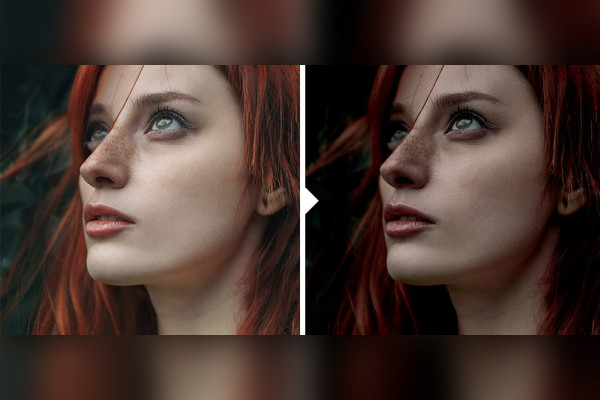
Capture One style for portraits: 01 | "Old Style"
Do you edit your portraits with Capture One? Here you can get a suitable preset for quick refinement. Simply apply the "Old Style" style. The sliders automatically move to preset positions, resulting in a breathtaking look.
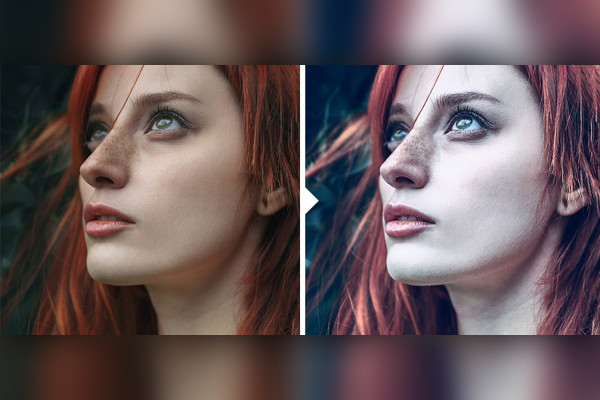
Capture One style for portraits: 02 | "Blue Moon"
Do you edit your portraits with Capture One? Here you get a suitable preset for quick refinement. Simply apply the "Blue Moon" style. The sliders automatically move to preset positions, resulting in a fascinating look.
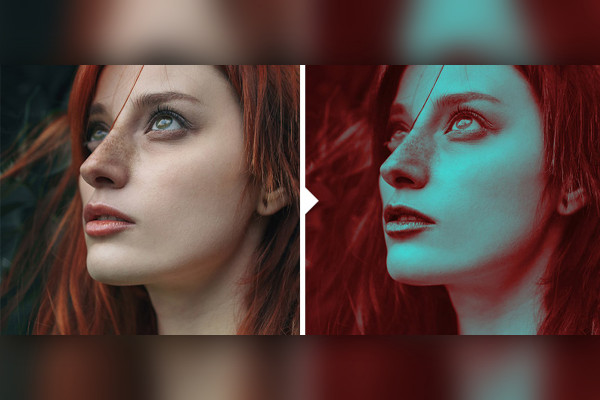
Capture One style for portraits: 03 | "Blue & Red"
Do you edit your portraits with Capture One? Here you get a suitable preset for quick refinement. Simply apply the "Blue & Red" style. The sliders automatically move to preset positions, resulting in a look worth seeing.
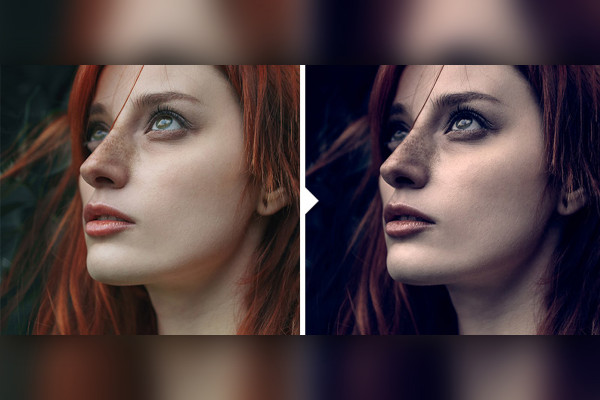
Capture One style for portraits: 04 | "Dark"
Do you edit your portraits with Capture One? Here you can get a suitable preset for quick refinement. Simply apply the "Dark" style. The sliders automatically move to preset positions, resulting in a mystical look.
Capture One style for portraits: 05 | "Dramatic Light"
Do you edit your portraits with Capture One? Here you can get a suitable preset for quick refinement. Simply apply the "Dramatic Light" style. The sliders automatically move to preset positions, resulting in a dramatic look.
Capture One style for portraits: 06 | "Bright Light"
Do you edit your portraits with Capture One? Here you get a suitable preset for quick refinement. Simply apply the "Bright Light" style. The sliders automatically move to preset positions, resulting in a magnificent look.
Capture One style for portraits: 07 | "Mystery Movie"
Do you edit your portraits with Capture One? Here you get a suitable preset for quick refinement. Simply apply the "Mystery Movie" style. The sliders automatically move to preset positions, resulting in a mystical look.
Capture One style for portraits: 08 | "Drama"
Do you edit your portraits with Capture One? Here you get a suitable preset for quick refinement. Simply apply the "Drama" style. The sliders automatically move to preset positions, resulting in a dramatic look.
Capture One style for portraits: 09 | "Green Light"
Do you edit your portraits with Capture One? Here you can get a suitable preset for quick refinement. Simply apply the "Green Light" style. The sliders automatically move to preset positions, resulting in an eye-catching look.
Capture One style for portraits: 10 | "Polaroid"
Do you edit your portraits with Capture One? Here you get a suitable preset for quick refinement. Simply apply the "Polaroid" style. The sliders automatically move to preset positions, resulting in a cool look.
Capture One style for portraits: 11 | "Soft Film"
Do you edit your portraits with Capture One? Here you can get a suitable preset for quick refinement. Simply apply the "Soft Film" style. The sliders automatically move to preset positions, resulting in a beautiful look.
Capture One style for portraits: 12 | "Dark Light"
Do you edit your portraits with Capture One? Here you can get a suitable preset for quick refinement. Simply apply the "Dark Light" style. The sliders automatically move to preset positions, resulting in a mystical look.
Capture One style for portraits: 13 | "Hard Look"
Do you edit your portraits with Capture One? Here you get a suitable preset for quick refinement. Simply apply the "Hard Look" style. The sliders automatically move to preset positions, resulting in an eye-catching look.
Capture One style for portraits: 14 | "Black and White"
Do you edit your portraits with Capture One? Here you get a suitable preset for quick refinement. Simply apply the "Black and White" style. The sliders automatically move to preset positions, resulting in a stunning look.
Capture One style for portraits: 15 | "Soft Sepia"
Do you edit your portraits with Capture One? Here you can get a suitable preset for quick refinement. Simply apply the "Soft Sepia" style. The sliders automatically move to preset positions, resulting in an atmospheric look.
Capture One style for portraits: 16 | "Bright Blue"
Do you edit your portraits with Capture One? Here you get a suitable preset for quick refinement. Simply apply the "Bright Blue" style. The sliders automatically move to preset positions, resulting in an eye-catching look.
Capture One style for portraits: 17 | "Sunny Winter"
Do you edit your portraits with Capture One? Here you get a suitable preset for quick refinement. Simply apply the "Sunny Winter" style. The sliders automatically move to preset positions, resulting in a beautiful look.
Capture One style for portraits: 18 | "Classic Look"
Do you edit your portraits with Capture One? Here you get a suitable preset for quick refinement. Simply apply the "Classic Look" style. The sliders automatically move to preset positions, resulting in a beautiful look.
Capture One style for portraits: 19 | "Contrast"
Do you edit your portraits with Capture One? Here you get a suitable preset for quick refinement. Simply apply the "Contrast" style. The sliders automatically move to preset positions, resulting in a beautiful look.
Capture One style for portraits: 20 | "Blue Extreme"
Do you edit your portraits with Capture One? Here you get a suitable preset for quick refinement. Simply apply the "Blue Extreme" style. The sliders automatically move to preset positions, resulting in an eye-catching look.
Capture One style for portraits: 21 | "Green Extreme"
Do you edit your portraits with Capture One? Here you can get a suitable preset for quick refinement. Simply apply the "Green Extreme" style. The sliders automatically move to preset positions, resulting in an eye-catching look.
Capture One style for portraits: 22 | "Red Cover"
Do you edit your portraits with Capture One? Here you get a suitable preset for quick refinement. Simply apply the "Red Cover" style. The sliders automatically move to preset positions, resulting in an eye-catching look.
Capture One style for portraits: 23 | "Violet Extreme"
Do you edit your portraits with Capture One? Here you get a suitable preset for quick refinement. Simply apply the "Violet Extreme" style. The sliders automatically move to preset positions, resulting in an eye-catching look.
Capture One style for portraits: 24 | "Soft Yellow"
Do you edit your portraits with Capture One? Here you get a suitable preset for quick refinement. Simply apply the "Soft Yellow" style. The sliders automatically move to preset positions, resulting in a fascinating look.
Capture One style for portraits: 25 | "Light it up"
Do you edit your portraits with Capture One? Here you get a suitable preset for quick refinement. Simply apply the "Light it up" style. The sliders automatically move to preset positions, resulting in a beautiful look.
Capture One style for portraits: 26 | "Charming"
Do you edit your portraits with Capture One? Here you get a suitable preset for quick refinement. Simply apply the "Charming" style. The sliders automatically move to preset positions, resulting in a beautiful look.
Capture One style for portraits: 27 | "Black & Blue"
Do you edit your portraits with Capture One? Here you get a suitable preset for quick refinement. Simply apply the "Black & Blue" style. The sliders automatically move to preset positions, resulting in an eye-catching look.
Capture One style for portraits: 28 | "Black & Yellow"
Do you edit your portraits with Capture One? Here you get a suitable preset for quick refinement. Simply apply the "Black & Yellow" style. The sliders automatically move to preset positions, resulting in an eye-catching look.
Capture One style for portraits: 29 | "Black & Green"
Do you edit your portraits with Capture One? Here you get a suitable preset for quick refinement. Simply apply the "Black & Green" style. The sliders automatically move to preset positions, resulting in an eye-catching look.
Capture One style for portraits: 30 | "Light Purple"
Do you edit your portraits with Capture One? Here you can get a suitable preset for quick refinement. Simply apply the "Light Purple" style. The sliders automatically move to preset positions, resulting in a look worth seeing.
Capture One style for portraits: 31 | "Light Red"
Do you edit your portraits with Capture One? Here you can get a suitable preset for quick refinement. Simply apply the "Light Red" style. The sliders automatically move to preset positions, resulting in a look worth seeing.
Capture One style for portraits: 32 | "Cyan is there"
Do you edit your portraits with Capture One? Here you can get a suitable preset for quick refinement. Simply apply the "Cyan is there" style. The sliders automatically move to preset positions, resulting in an eye-catching look.
Capture One style for portraits: 33 | "Violet is coming"
Do you edit your portraits with Capture One? Here you can get a suitable preset for quick refinement. Simply apply the "Violet is coming" style. The sliders automatically move to preset positions, resulting in an eye-catching look.
Capture One style for portraits: 34 | "Red Light"
Do you edit your portraits with Capture One? Here you get a suitable preset for quick refinement. Simply apply the "Red Light" style. The sliders automatically move to preset positions, resulting in an eye-catching look.
Capture One style for portraits: 35 | "Retro Light"
Do you edit your portraits with Capture One? Here you can get a suitable preset for quick refinement. Simply apply the "Retro Light" style. The sliders automatically move to preset positions, resulting in a stunning look.
Capture One style for portraits: 36 | "Retro Yellow"
Do you edit your portraits with Capture One? Here you get a suitable preset for quick refinement. Simply apply the "Retro Yellow" style. The sliders automatically move to preset positions, resulting in an eye-catching look.
Capture One style for portraits: 37 | "Retro Rose"
Do you edit your portraits with Capture One? Here you get a suitable preset for quick refinement. Simply apply the "Retro Rose" style. The sliders automatically move to preset positions, resulting in an eye-catching look.
Capture One style for portraits: 38 | "Yellow Yes"
Do you edit your portraits with Capture One? Here you can get a suitable preset for quick refinement. Simply apply the "Yellow Yes" style. The sliders automatically move to preset positions, resulting in an eye-catching look.
Capture One style for portraits: 39 | "BW"
Do you edit your portraits with Capture One? Here you get a suitable preset for quick refinement. Simply apply the "BW" style. The sliders automatically move to preset positions, resulting in a classic look.
Capture One style for portraits: 40 | "BW Bright"
Do you edit your portraits with Capture One? Here you can get a suitable preset for quick refinement. Simply apply the "BW Bright" style. The sliders automatically move to preset positions, resulting in a beautiful look.
Capture One style for portraits: 41 | "BW Classic"
Do you edit your portraits with Capture One? Here you get a suitable preset for quick refinement. Simply apply the "BW Classic" style. The sliders automatically move to preset positions, resulting in a beautiful look.
Capture One style for portraits: 42 | "BW Soft"
Do you edit your portraits with Capture One? Here you get a suitable preset for quick refinement. Simply apply the "BW Soft" style. The sliders automatically move to preset positions, resulting in a beautiful look.
Capture One style for portraits: 43 | "Color"
Do you edit your portraits with Capture One? Here you get a suitable preset for quick refinement. Simply apply the "Color" style. The sliders automatically move to preset positions, resulting in a look worth seeing.
Capture One style for portraits: 44 | "Night is coming"
Do you edit your portraits with Capture One? Here you get a suitable preset for quick refinement. Simply apply the "Night is coming" style. The sliders automatically move to preset positions, resulting in a look worth seeing.
Capture One style for portraits: 45 | "Summer Time"
Do you edit your portraits with Capture One? Here you get a suitable preset for quick refinement. Simply apply the "Summer Tim" style. The sliders automatically move to preset positions, resulting in a stunning look.
Capture One style for portraits: 46 | "Soft Color"
Do you edit your portraits with Capture One? Here you can get a suitable preset for quick refinement. Simply apply the "Soft Color" style. The sliders automatically move to preset positions, resulting in a stunning look.
Capture One style for portraits: 47 | "Sun"
Do you edit your portraits with Capture One? Here you get a suitable preset for quick refinement. Simply apply the "Sun" style. The sliders automatically move to preset positions, resulting in a stunning look.
Capture One style for portraits: 48 | "Bright Sunlight"
Do you edit your portraits with Capture One? Here you can get a suitable preset for quick refinement. Simply apply the "Bright Sunlight" style. The sliders automatically move to preset positions, resulting in a stunning look.
Capture One style for portraits: 49 | "Sunset"
Do you edit your portraits with Capture One? Here you get a suitable preset for quick refinement. Simply apply the "Sunset" style. The sliders automatically move to preset positions, resulting in a stunning look.
Capture One style for portraits: 50 | "Dark Sunset"
Do you edit your portraits with Capture One? Here you get a suitable preset for quick refinement. Simply apply the "Dark Sunset" style. The sliders automatically move to preset positions, resulting in a stunning look.
Capture One style for portraits: 01 | "Old Style"
Capture One style for portraits: 02 | "Blue Moon"
Capture One style for portraits: 03 | "Blue & Red"
Capture One style for portraits: 04 | "Dark"
Capture One style for portraits: 05 | "Dramatic Light"
Capture One style for portraits: 06 | "Bright Light"
Capture One style for portraits: 07 | "Mystery Movie"
Capture One style for portraits: 08 | "Drama"
Capture One style for portraits: 09 | "Green Light"
Capture One style for portraits: 10 | "Polaroid"
Capture One style for portraits: 11 | "Soft Film"
Capture One style for portraits: 12 | "Dark Light"
Capture One style for portraits: 13 | "Hard Look"
Capture One style for portraits: 14 | "Black and White"
Capture One style for portraits: 15 | "Soft Sepia"
Capture One style for portraits: 16 | "Bright Blue"
Capture One style for portraits: 17 | "Sunny Winter"
Capture One style for portraits: 18 | "Classic Look"
Capture One style for portraits: 19 | "Contrast"
Capture One style for portraits: 20 | "Blue Extreme"
Capture One style for portraits: 21 | "Green Extreme"
Capture One style for portraits: 22 | "Red Cover"
Capture One style for portraits: 23 | "Violet Extreme"
Capture One style for portraits: 24 | "Soft Yellow"
Capture One style for portraits: 25 | "Light it up"
Capture One style for portraits: 26 | "Charming"
Capture One style for portraits: 27 | "Black & Blue"
Capture One style for portraits: 28 | "Black & Yellow"
Capture One style for portraits: 29 | "Black & Green"
Capture One style for portraits: 30 | "Light Purple"
Capture One style for portraits: 31 | "Light Red"
Capture One style for portraits: 32 | "Cyan is there"
Capture One style for portraits: 33 | "Violet is coming"
Capture One style for portraits: 34 | "Red Light"
Capture One style for portraits: 35 | "Retro Light"
Capture One style for portraits: 36 | "Retro Yellow"
Capture One style for portraits: 37 | "Retro Rose"
Capture One style for portraits: 38 | "Yellow Yes"
Capture One style for portraits: 39 | "BW"
Capture One style for portraits: 40 | "BW Bright"
Capture One style for portraits: 41 | "BW Classic"
Capture One style for portraits: 42 | "BW Soft"
Capture One style for portraits: 43 | "Color"
Capture One style for portraits: 44 | "Night is coming"
Capture One style for portraits: 45 | "Summer Time"
Capture One style for portraits: 46 | "Soft Color"
Capture One style for portraits: 47 | "Sun"
Capture One style for portraits: 48 | "Bright Sunlight"
Capture One style for portraits: 49 | "Sunset"
Capture One style for portraits: 50 | "Dark Sunset"
Examples of use
Open gallery
Example: Apply the desired style - and a new look is created.
Open gallery
Example: You can adjust the preset parameters afterwards.
Open gallery
Example: Give your portraits an eye-catching look with just a few clicks.
Open gallery
Example: From black and white to soft contrast enhancement - choose what suits you from 50 styles.
Open gallery
Example: Dare to compare before and after and achieve outstanding results.
Comments (0)
Comment now „Capture One: 50 presets for portrait styles“





Comment now „Capture One: 50 presets for portrait styles“