Do you like shortcuts? Then buckle up, because you won't get anywhere faster than with our ultimate reference card bundle! The package contains over 20 reference cards for different programs with all the important keyboard shortcuts to speed up your daily use and work with your favorite software. Shift to the next gear with just a few finger movements - the large reference card bundle makes it possible!
All important commands at a glance, peppered with useful tips
Handy A4 landscape format and practical to use
For Acrobat, After Effects, Blender, Cinema 4D, CorelDRAW, Dreamweaver, Excel, GIMP, Illustrator, InDesign, PaintShop Pro, Photoshop, Photoshop Elements, Photoshop Lightroom, WordPress and various web languages such as PHP, MySQL, HTML & CSS as well as typographic special characters
Time is money! And every click means time Accelerate your workflow and work much more efficiently from now on!
content
Details of the content
Adobe Acrobat DC
Adobe Acrobat reference card
Highlight, underline or cross out text, stamp documents, add comments and have your text read aloud - Adobe Acrobat DC offers numerous functions for working with PDFs. If you use keyboard shortcuts, you can navigate more easily and quickly, thus saving time. This reference card summarizes all important keyboard shortcuts in an overview.
Adobe Acrobat reference card
After Effects
Reference card with the best keyboard shortcuts and tricks for After Effects
The reference cards contain all the important keyboard shortcuts that significantly speed up daily work with Adobe After Effects. There is an overview of the essential shortcuts on the front. The reverse side contains some great tips on how to use tools and shortcuts effectively. For After Effects 7-CS5.5.
Reference card with the best keyboard shortcuts and tricks for After Effects
Blender
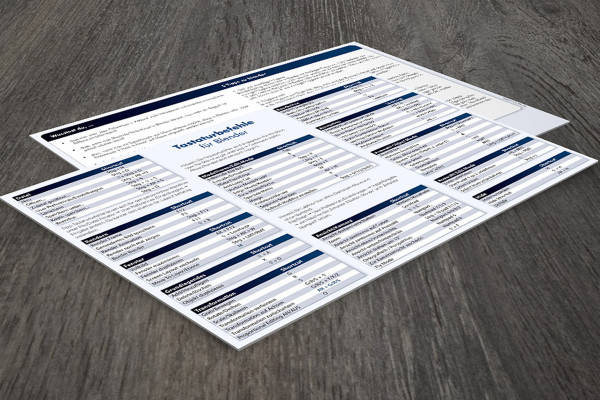
Reference card for Blender - the most important shortcuts and tips for Blender
The reference card for Blender contains all the important keyboard shortcuts that significantly speed up your daily work with Blender. On the front there is an overview of the essential shortcuts. The back contains some great tips on how to use tools and shortcuts effectively. The reference card is intended as a PDF document to be printed out and placed on the work surface/pinned to the wall. The front side really does contain the most important keyboard shortcuts for working effectively with Blender. A basic tool for users to work even more advanced with Blender. The reference card is optimized for Blender 2.6 - but is also very suitable for previous versions. The reference map can be downloaded here.
Reference card for Blender - the most important shortcuts and tips for Blender
Cinema 4D
Reference card for Maxon CINEMA 4D - the most important shortcuts and tips for CINEMA 4D
The reference card for Maxon CINEMA 4D contains all the important keyboard shortcuts that significantly speed up daily work with CINEMA 4D. On the front there is an overview of the essential shortcuts. The back contains 14 great tips for effective handling of tools and shortcuts as well as 6 elementary points for working with CINEMA 4D. The reference card is intended as a PDF document to be printed out and placed on the work surface/pinned to the wall. The front side really does contain the most important keyboard shortcuts for meaningful work with CINEMA 4D. A basic tool for users to work even more advanced and faster with CINEMA 4D. The reference card is optimized for Maxon CINEMA 4D R 11.5 - but is also suitable for previous versions. The reference card can be downloaded here. It is available in our store professionally printed and laminated at a reasonable price in combination with a DVD purchase.
Reference card for Maxon CINEMA 4D - the most important shortcuts and tips for CINEMA 4D
CorelDRAW
Reference card for CorelDRAW - the most important shortcuts and tips for CorelDRAW
The reference cards contain all the important keyboard shortcuts that significantly speed up your daily work with CorelDRAW. There is an overview of the essential shortcuts on the front. The back contains some great tips on how to use tools and shortcuts effectively.
Reference card for CorelDRAW - the most important shortcuts and tips for CorelDRAW
Excel
Microsoft Excel reference card
Using Microsoft Excel on a daily basis usually involves screen-filling tables with thousands and thousands of values and information. It's good to be able to make the right cell selection quickly, navigate safely through workbooks and have the right formula to hand at any moment! This reference card contains all the important keyboard shortcuts for working with Microsoft Excel and also includes 45 essential formulas and functions that are always needed. Just two or three keys instead of laborious and time-consuming searches in the menus and menu sub-items - speed up your workflow and save a lot of time and nerves!
All important keyboard shortcuts, including for quick selection of menus, formatting and cells
45 functions that simplify finding and sorting values and spreadsheets
Compact and handy, for practical and time-saving use
Use combinations that let you master folders, sheets, tables and thousands of cells quickly and skillfully! And use helpful functions that simplify the handling of numbers and values. Everything on one card - everything at a glance!
Microsoft Excel reference card
GIMP
Reference card for GIMP - the most important shortcuts and tips for GIMP
The reference card for GIMP contains all the important keyboard shortcuts that significantly speed up your daily work with GIMP. There is an overview of the most important shortcuts on the front. The reverse side contains some great tips on how to use tools and shortcuts effectively. The reference card is intended as a PDF document to be printed out and placed on the work surface/pinned to the wall. The front side really does contain the most important keyboard shortcuts for working effectively with GIMP. A basic tool for users to work even more advanced with GIMP. The reference card is optimized for GIMP 2.8 - but is also very suitable for previous versions. The reference card can be downloaded here. It is available in our store professionally printed and laminated at a reasonable price.
Reference card for GIMP - the most important shortcuts and tips for GIMP
Illustrator
Reference card for Adobe Illustrator - The most important shortcuts and tips for Illustrator
The reference card for Adobe Illustrator contains all the important keyboard shortcuts that significantly speed up your daily work with Illustrator. There is an overview of the essential shortcuts on the front. The reverse side contains some great tips on the effective handling of tools and shortcuts as well as 7 elementary points for working with the layers panel. The reference card is intended as a PDF document to be printed out and placed on the work surface/pinned to the wall. The front side really does contain the most important keyboard shortcuts for useful work with Illustrator. A basic tool for users to work even more advanced and faster with Illustrator. The reference card is optimized for Adobe Illustrator CS4 + CC - but is also suitable for previous versions. The reference card can be downloaded here. In our store it is available professionally printed and laminated at a reasonable price in combination with a DVD purchase.
Reference card for Adobe Illustrator - The most important shortcuts and tips for Illustrator
InDesign
Reference card for Adobe InDesign CS6 - the most important shortcuts and tips for InDesign
The reference card for Adobe InDesign contains all the important keyboard shortcuts that significantly speed up your daily work with InDesign. There is an overview of the essential shortcuts on the front. The reverse side contains some great tips on the effective handling of tools and shortcuts as well as 6 elementary points for working with layout files. The reference card is intended as a PDF document to be printed out and placed on the work surface/pinned to the wall. The front side really does contain the most important keyboard shortcuts for useful work with InDesign. A basic tool for users to work even more advanced and faster with InDesign. The reference card is optimized for Adobe InDesign CS6 - but is also suitable for previous versions.
Reference card for Adobe InDesign CS6 - the most important shortcuts and tips for InDesign
PaintShopPro
Reference card for Corel PaintShopPro
The reference card contains all the important keyboard shortcuts that significantly speed up your daily work with Corel PaintShopPro. There is an overview of the most important shortcuts on the front. The reverse side contains some great tips on how to use tools and shortcuts effectively. The reference card is intended as a PDF document to be printed out and placed on the work surface/pinned to the wall. The front side really does contain the most important keyboard shortcuts for working effectively with Paint Shop Pro. A basic tool for users to work even more advanced and faster with Paint Shop Pro. The reference card is optimized for Corel Paint Shop Pro Photo X6 and X5 - but is also suitable for previous versions. The reference card can be downloaded here. In our store it is available professionally printed and laminated at a reasonable price in combination with a DVD purchase.
Reference card for Corel PaintShopPro
Photoshop
Reference card for Adobe Photoshop CC - the most important shortcuts and tips for Photoshop
The reference card for Photoshop contains all the important keyboard shortcuts that significantly speed up your daily work with Photoshop. On the front there is an overview of the essential shortcuts. The reverse side contains some great tips on the effective handling of tools and shortcuts as well as 6 elementary points on working with layers.
The reference card is intended as a PDF document to be printed out and placed on the work surface/pinned to the wall. The front contains the most important keyboard shortcuts for working with Photoshop. A basic tool for users to work even more advanced with Photoshop. The reference card is optimized for Adobe Photoshop CC - but also very suitable for previous versions. The reference card can be downloaded here.
Reference card for Adobe Photoshop CS6 - the most important shortcuts and tips for Photoshop
The reference card for Photoshop contains all the important keyboard shortcuts that significantly speed up your daily work with Photoshop. On the front there is an overview of the essential shortcuts. The reverse side contains some great tips on the effective handling of tools and shortcuts as well as 6 elementary points on working with layers.
The reference card is intended as a PDF document to be printed out and placed on the work surface/pinned to the wall. The front contains the most important keyboard shortcuts for working with Photoshop. A basic tool for users to work even more advanced with Photoshop. The reference card is optimized for Adobe Photoshop CS6 - but is also very suitable for previous versions. The reference card can be downloaded here.
Reference card for Adobe Photoshop CC - the most important shortcuts and tips for Photoshop
Reference card for Adobe Photoshop CS6 - the most important shortcuts and tips for Photoshop
Photoshop Elements
Photoshop Elements 11 reference card
Photoshop Elements 11 reference card for the individual tool panels in Quick, Wizard and Expert mode. Additionally a small info for further (hidden) tools in the tool options.
Reference card for Photoshop Elements for printing as a PDF file
The reference cards contain all the important keyboard shortcuts that significantly speed up your daily work with Adobe Photoshop Elements. There is an overview of the most important shortcuts on the front. The back contains some great tips on how to use tools and shortcuts effectively. For Photoshop Elements 7-10.
Photoshop Elements 11 reference card
Reference card for Photoshop Elements for printing as a PDF file
Photoshop Lightroom
Reference card for Adobe Photoshop Lightroom - the most important shortcuts and tips for Lightroom
The reference card for Photoshop Lightroom contains all the important keyboard shortcuts that significantly speed up your daily work with Photoshop Lightroom. There is an overview of the essential shortcuts on the front. The back contains some great tips on how to use tools and shortcuts effectively as well as links to presets. The reference card is intended as a PDF document that you can print out and place on your work surface or pin to the wall. The front side really does contain the most important shortcuts for working sensibly with Photoshop Lightroom. A basic tool for users to work even more advanced with Photoshop Lightroom. The reference card is optimized for Adobe Photoshop Lightroom 4 - but is also very suitable for previous versions. The reference card can be downloaded here.
Reference card for Adobe Photoshop Lightroom - the most important shortcuts and tips for Lightroom
Special character
Reference card for special characters - Typographic rules and common mistakes
The reference card contains all the important keyboard shortcuts that significantly speed up your daily work. There is an overview of the essential shortcuts on the front. The back contains some great tips.
The reference card is intended as a PDF document to be printed out and placed on the work surface/pinned to the wall. The front contains the really important keyboard shortcuts for useful work. The reference card can be downloaded here.
Reference card for special characters - Typographic rules and common mistakes




 These reference cards are included in the bundle
 These reference cards are included in the bundle
Comment now „The large reference card bundle“